How a student built Segue, and how to build a DJ-set app yourself
· buildtolaunch
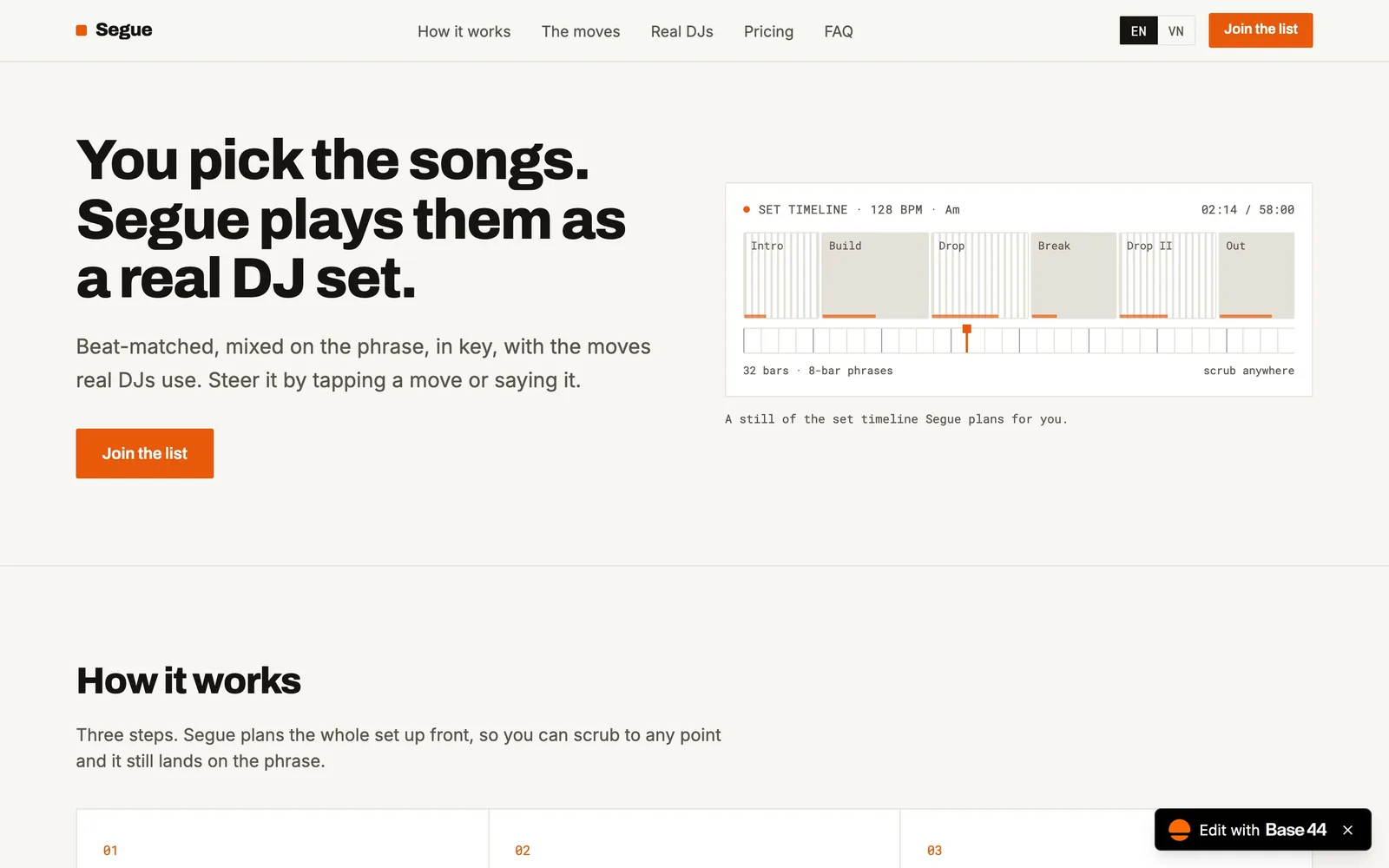
Segue turns a pile of songs into a DJ set, and a student built it in one afternoon. This guide explains what Segue does, the idea behind it, and how you can build your own app of the same kind, even if you do not code. See more student builds in the student project library (in Vietnamese).
Short answer
Segue is a web app by Nimit, a participant at Vibe-a-thon Saigon. You choose songs and a shape for the set, and Segue plans the whole set and mixes it beat-matched and in key. It won the "Daily listening" track and runs on Base44, the build tool used at the event. You can build a similar app by describing it in plain language to an AI builder.
What Segue does
Segue by Nimit, built in one afternoon at Vibe-a-thon Saigon.
A playlist is just songs in a row. The gaps are awkward, the keys clash, and there is no build-up. Real DJs fix this with years of practice. Segue's idea is to do the planning for you: pick songs, pick the shape of the set, and the app orders and mixes them so each song flows into the next.
You can open Segue here. It was built at Vibe-a-thon Saigon (Sunday 27 September 2026, at WORK X), where the brief was short: start from something you already use, build the thing you wish existed, and leave with a link anyone can open. The recap of the day is on the Vibe-a-thon Saigon recap page.
Where the idea comes from
Segue follows the rule that every Vibe-a-thon builder got: finish the sentence "I wish [an app I use daily] could...". The app is Spotify-style listening, and the wish is "...mix my songs like a DJ". The idea is small, personal and has a first user, the builder, who knows immediately if it is right.
This is the pattern in most student apps: one daily habit, one annoyance, one feature. SayStrike did it for pronunciation, GatherGO for group plans. See the pattern across all of them in the project library.
Build a Segue-style app yourself
This is a walkthrough for building an app of the same kind, not a record of Nimit's own steps. The tools are free to start (as checked on 18 Nov 2026): Base44 has a Free plan with 25 message credits a month, capped at 5 a day, and Lovable has 5 daily credits, capped at 30 a month. Plan your prompts so you do not run out.
Step 1: Learn the two ideas behind a good transition
DJs match two things between songs.
- Tempo (BPM, beats per minute): songs with a similar BPM can be blended without one sounding like it speeds up or drags.
- Key: songs in related keys sound smooth together. DJs use the Camelot wheel, a chart that gives every key a number and a letter. According to Mixed In Key's harmonic mixing guide, you can move to the same key (5A to 5A), to an adjacent number (5A to 4A or 6A), or switch the letter at the same number (5A to 5B). Big jumps such as 3A to 9A are risky and best used sparingly.
You do not have to understand music theory deeply. You only need to tell the AI these rules, and it will implement them.
Step 2: Decide the smallest version
For a first version, skip audio entirely. Let the user type or paste songs with their BPM and key, and let the app suggest an order and a note on how to move between each pair. That is enough to be useful, and it is much easier than playing and blending audio in a browser. Add more later.
Step 3: Write one clear prompt
Paste something like this into the builder and edit it for your taste:
Build me a web app where I paste a list of songs with their BPM and Camelot key. I choose a set shape (warm-up, peak, cool-down). The app suggests an order that keeps BPM changes small and moves between compatible Camelot keys (same key, plus or minus one number, or the same number with the other letter). For each pair of songs, show a short note on how to transition. Mobile first, dark theme, interface in English.
Add one line for "done": "It is finished when I can paste 8 songs and see a numbered order with transition notes."
Step 4: Test with real songs
Use a playlist you know well. Check three things: does the order feel right, do the transition notes make sense, and can you fix a wrong BPM or key quickly? Change one thing at a time ("make BPM jumps smaller", "show the key next to each song").
Step 5: Share the link and listen
Send the link to five friends who like music. Ask: "What was the first thing that confused you?" Fix that one thing. Then post it publicly, for example on the Launch League.
Mistakes to avoid
- Starting with audio mixing. It is the hardest part. Prove the idea works with the planning first.
- Copying a streaming service. Give your app its own name and design, and follow the platform's developer terms if you connect to its API.
- Asking for ten features. One main job is what makes Segue clear: plan and mix a set.
More student builds and ideas
If you liked this, see the live apps for YellowMiso and Smile Andy, or browse app ideas that solve real university student problems. For a list that fits a free afternoon, see weekend project ideas under 4 hours.
Build yours with buildtolaunch
buildtolaunch is a free community for university students in Vietnam and Southeast Asia, with no paid tier and no coding needed to start. You can learn from 70+ free courses, practise with an AI tutor, build in a Space with an AI teammate, and post your launch on a public board that resets every Monday. Create a free profile.
Read the full guide: student project library.
FAQ
Who built Segue?
Segue was built by Nimit at Vibe-a-thon Saigon, a build day run by buildtolaunch in Saigon on Sunday 27 September 2026. It won the "Daily listening" track. The app is live at segue.base44.app.
What does Segue do?
It plans a DJ-style set from songs you choose. You pick the songs and the shape of the set, and Segue arranges and mixes them so tempo and key match from one song to the next. It is a good example of a small, single-purpose student app.
What tool was Segue built with?
The app is hosted on Base44, the build tool used at the event. Base44 lets you describe an app in plain language and builds it for you. The details of Nimit's own prompts and process are not covered in this article.
Can a non-coder build an app like Segue?
Yes. AI builders write the code from your description. Start with a version that plans the order of songs from typed BPM and key, then add audio later if you want. Many people at Vibe-a-thon Saigon had no coding background and still shipped working apps in one afternoon.
How much does it cost to build an app like this?
You can start for free. Base44 and Lovable both have free plans with credit limits (as checked on 18 Nov 2026), so write a clear first prompt to save credits. Costs appear when you need more credits, a custom domain or more users.