The Student Launch Playbook: From Working Link to Your First Real Users
· buildtolaunch
You built something and it works. Now you need people to use it. This playbook is for students with no audience, a busy semester and a project link: what to prepare, how to run a launch week, how to get your first 10 and then 100 users, and what to do when nobody comes.
Short answer
Launch in small steps. First make sure the project has a public link and a one-line pitch. Then send it personally to ten people who have the problem and ask for one piece of feedback. Next post in student communities and on a friendly launch board, fix the biggest issue, and only then try big public sites. Repeat every week.
Are you ready to launch? A 10-minute checklist
You do not need a finished product. You need something a stranger can open and understand in under a minute. Check these five things:
- A public link that works on a phone. Open it on your own phone, on mobile data, while logged out. Most students will see it on a phone first.
- A one-line pitch. "A [thing] for [who] that [does what]." If you cannot say it in one sentence, your first users will not be able to repeat it either. See how to write your one-line pitch.
- One clear first action. What should a new visitor do in the first 30 seconds: sign up, paste a text, upload a photo, press a button? Remove everything that gets in the way of that action.
- A way to get feedback. A short form, a Zalo or Messenger link, or your email on the page. If people cannot reach you, you will not learn anything.
- A name and look of your own. A real name, a logo or at least a clean title, and no leftover template text such as "Lorem ipsum" or the default tool branding on every page. A printable version of this list is in the one-page launch checklist.
Not at this stage yet? If you have a rough idea but no working version, read MVP là gì? Làm MVP trong một tuần bằng AI (in Vietnamese), and the guide to learning vibe coding for free.
Two optional extras that help a lot: a 60-second screen recording (quay video demo app 60 giây, in Vietnamese) and a simple landing page (làm landing page và danh sách chờ miễn phí, in Vietnamese).
Launch week, day by day
This plan assumes you have no audience and about an hour a day. Adjust the days to your exam schedule, but keep the order.
| Day | What you do | Goal |
|---|---|---|
| 1 | Message 10 people directly: classmates, club members, friends who have the problem. Send the link and ask one specific question. | 5 people open it, 3 reply |
| 2 | Post in student groups where you are already a member. Say what you built, who it is for, and ask for feedback, not likes. | A few comments and new messages |
| 3 | Post a launch on a friendly board (on buildtolaunch, the Launch League). Add a screenshot and the one-line pitch. | First feedback from strangers who build things |
| 4 | Talk to the people who used it. Ask what they tried to do and where they got stuck. Write down the exact words they use. | 3 conversations |
| 5 | Fix the single biggest issue. Only one. Tell the people who reported it that it is fixed. | One visible improvement |
| 6 | Post an update: what you learned and what changed. A short post with a before and after screenshot works well. | A reason for people to come back |
| 7 | Count what happened (see the measuring section below) and decide: improve, change the audience, or move on. | One decision for next week |
Two notes on the groups in day 2. First, groups have rules and admins, and a post that reads like an advert gets deleted and can get you muted. Read the rules, join the conversation for a few days before you post, and make the post useful. There is a Vietnamese guide on this: đăng sản phẩm lên group Facebook sinh viên mà không bị coi là spam. Second, if you are unsure how to word the post, use the mẫu bài launch sản phẩm (Vietnamese templates).
Where to post
Think of it as a ladder. Start at the bottom, where people already know you or are kind to beginners, and climb as you gain early users.
- People you know. Direct messages to classmates and friends with the problem.
- Student communities. Class groups, club channels, and Zalo, Facebook and Messenger groups where you are already active. See also the guide to launching on Threads and TikTok (Vietnamese).
- A friendly practice board. A place where other builders try new projects and give feedback. Launch League vs Product Hunt vs Peerlist compares three of them.
- Public launch sites. Product Hunt, Hacker News and similar sites. They can bring traffic and feedback, but they work best when you already have a few real users and people who will comment. Read the Product Hunt launch checklist for student makers and Show HN for student projects.
Are free launch sites still free?
Not all of them. Many old "list of 50 places to launch" posts are out of date. As checked on 18 Nov 2026, BetaList's help page says all submissions are paid, that there is no free option, and that it used to offer free submissions. Prices are shown at the end of its submission form and can change, so check them there before you decide. Product Hunt's own FAQ says launching is free. For an updated list, see launch sites that are still free in 2026.
Is Product Hunt worth it for a student?
Sometimes, but not first. Product Hunt tells makers not to ask for upvotes, says that upvotes from established, active members count for more than upvotes from brand-new accounts, and says the leaderboard looks at comments and other signals, not only upvotes. A launch with no audience and no friends who already use the site starts at a disadvantage. That does not make it useless: the same help pages say success can also mean feedback, users and connections, not only a top ranking. Use it after you have early users and a story to tell.
Your first 10 users, then 100
The first 10 are personal. Find ten people who have the exact problem your project solves. Message each one with the link and one question. Do not send "please try my app". Send "I built this for people who [problem]. Could you try it and tell me the first thing that confused you?" Watch them use it if you can. Fix the biggest problem and ask the ones who liked it to share it with one friend.
The next 90 come from repeating what worked. Look at where your first users came from and do more of it:
- Communities with the same problem. The more specific the group, the better the response.
- Build-in-public posts. Short posts about what you built, what broke and what you learned bring people who care about the same problem. See Build in public là gì? (Vietnamese).
- A referral ask. At the end of every conversation: "Who else do you know who has this problem?"
- Search, slowly. A page that answers a real question can bring visitors for months. Start with SEO basics for your side project.
The full step-by-step is in how to get your first 100 users as a student builder.
After launch: measure and learn
You only need three numbers at first:
| Number | What it tells you | How to count it |
|---|---|---|
| Visitors | Did people see it? | A free analytics tool |
| Users | Did they do the first action? | Sign-ups, or the button you wanted pressed |
| Returners | Did they come back within a week? | Same people on day 7 |
Free options for the counting: Cloudflare Web Analytics is free and described as privacy-first, collecting metrics without cookies. Microsoft Clarity describes itself as free and shows heatmaps and session recordings, which let you watch where people get stuck. Both were checked on 18 Nov 2026, and you should confirm the terms before relying on them.
Numbers tell you what happened. Conversations tell you why. After launch, talk to five users with the questions in 5 câu hỏi phỏng vấn người dùng sau khi launch (Vietnamese). If people try it once and leave, read my users don't come back: retention basics. The full measuring guide in Vietnamese is đo lường sau launch.
Launch every week, not once
A student rarely has one perfect launch day. A student has a semester. Small repeated launches beat one big day for three reasons:
- Each launch is cheap. A weekly post about one change takes an hour, so you do it even in exam month.
- You learn faster. Four small launches give you four rounds of feedback. One big launch gives you one.
- Silence stops being scary. If one week goes badly, the next is already coming.
The Launch League is built around this: a new board opens every Monday, members post what they shipped, and likes count as votes. It is a low-stakes place to practise before the public sites. For the longer argument, read why shipping every week beats one big launch, and for how the board works, Launch League là gì? (Vietnamese).
Build in public: when it is worth it
Building in public means sharing progress while you build, not only at the end. It works when you have something to show: a screenshot, a number, a problem you hit. It is not worth forcing when you have nothing yet. Many builders hold back because they feel they have nothing worth sharing. A rough screenshot and one honest sentence is usually enough to start. More in Build in public là gì?.
What if nobody comes?
It is normal. Most first launches get a handful of visits. Do not conclude that the idea is bad yet. Check three things, in this order:
- Problem. Do the people you reached actually have it, and do they care enough to try something new?
- Audience. Did you post where those people spend time, or where it was easiest to post?
- Message. Can a stranger understand what it does in five seconds?
Change one thing, launch again next week. The full troubleshooting list is in I launched and nobody came.
Two quick questions before you launch
- Web app or App Store? For a first launch, a web link is easier: no review wait, instant fixes, nothing to install. See web app or App Store?.
- Should I charge money? Not before people use it. First prove that they come back. When you are ready, read thu tiền từ app đầu tiên (Vietnamese).
Copy-paste messages for day 1 and day 2
Plain messages get more replies than polished ones. Change the brackets to your own words.
Direct message (day 1):
Hi [name], I built a small [tool] for [who] who [problem]. You told me last week that [specific thing they said], so I thought of you. Here is the link: [link]. Could you try it for two minutes and tell me the first thing that confused you? No need to be polite, I want the honest version.
Group post (day 2):
I am a [year] student at [school]. I kept running into [problem], so I built [name]: [one-line pitch]. It is a first version and I am looking for 5 people to try it and tell me what is broken. Link: [link]. If it is not useful to you, tell me why, that helps just as much.
Both messages do the same three things: say who it is for, ask for a small action, and ask for criticism instead of praise. People find it easier to say "yes, I will look" than "yes, I will like it".
A launch week for a class project (an example)
Here is how the plan could look for an imagined project, not a real case. A marketing student builds a small app that turns lecture notes into flashcards.
- Day 1: she messages 10 classmates from the same course who she knows are preparing for exams.
- Day 2: she posts in the cohort group, with a screenshot, and in one study club group where she is already a member.
- Day 3: she posts the app on a launch board with the pitch "Flashcards from your lecture notes in one click."
- Day 4: she calls three classmates and watches them use it. Two of them cannot find the upload button.
- Day 5: she makes the upload button bigger and tells those two people.
- Day 6: she posts a before and after screenshot with one line about what she learned.
- Day 7: 40 people visited, 12 uploaded notes, 4 came back. She decides to keep the audience (exam students) and improve the first minute.
The numbers are small on purpose. A first launch is a test of one belief, and these numbers are enough to decide what to do next.
Common mistakes in a first launch
- Launching to everyone. "Anyone who studies" is not an audience. Pick one group you can name.
- Asking for likes. Likes feel good and teach nothing. Ask a question that needs a sentence to answer.
- Fixing ten things at once. Fix the one thing that blocked most people, then launch again.
- Hiding until it is perfect. The first version is meant to be embarrassing. What you learn in a week of sharing is worth more than a month of polishing alone.
- Posting once and disappearing. Reply to every comment within a day. A launch is a conversation, not an announcement.
- Copying an old launch list. Sites change their prices and rules. Check each one yourself, as with BetaList above.
What a launch is worth for your portfolio
Revenue is not the only result. A public link, a short write-up of what you learned and a few real users show how you work: you picked a problem, built something, put it in front of people and improved it. That is useful evidence in a CV, a scholarship essay or an interview, and it is something you can show, not only describe. Keep a simple record as you go: the link, a screenshot, your numbers each week, and two or three sentences from real users, with their permission.
Launching with buildtolaunch
buildtolaunch is a free community for university students of any major, no coding needed to start. You can learn from 70+ free courses, build in a Space with an AI teammate, and post to the weekly Launch League board. Past events, such as the Vibe-a-thon Saigon, showed that people with no coding background can ship working apps in one afternoon. The opportunities page lists hackathons, competitions and programs where a launch can double as a portfolio piece. When you are ready, sign up.
Real builds from Vibe-a-thon Saigon
On Sunday 27 September 2026 (1:30 to 6:30 PM), at WORK X in Saigon, Vibe-a-thon attendees had one afternoon to turn an idea into a live app. No coding was required and there were no judges: everyone posted their project as a Launch, tried each other's apps and voted on the Launch League board. Each track had one winner, plus an award for the most unhinged idea.
| App | Builder | Track | What it does |
|---|---|---|---|
| Segue | Nimit | Daily listening | You pick the songs and a set shape; Segue plans the whole set and mixes it beat matched, in key, on the phrase |
| SayStrike | Bernie | Learning a language | Say each word right to land an attack on TED-REX, a monster that feeds on mispronounced past tense verbs |
| GatherGO | Thanh Huynh Dieu | Sharing with your closest people | Find spots worth going to, let the crew vote, then lock a plan with a time and the people coming |
| Smile Andy | Teddy Bui | Build your own | Reads your face through the webcam, offers to cheer you up out loud when you frown, and is built to save nothing |
| YellowMiso | Choi Byeongmin | Most unhinged idea | Look at your Mac and it unlocks, using the plain webcam and built to run on the device itself |
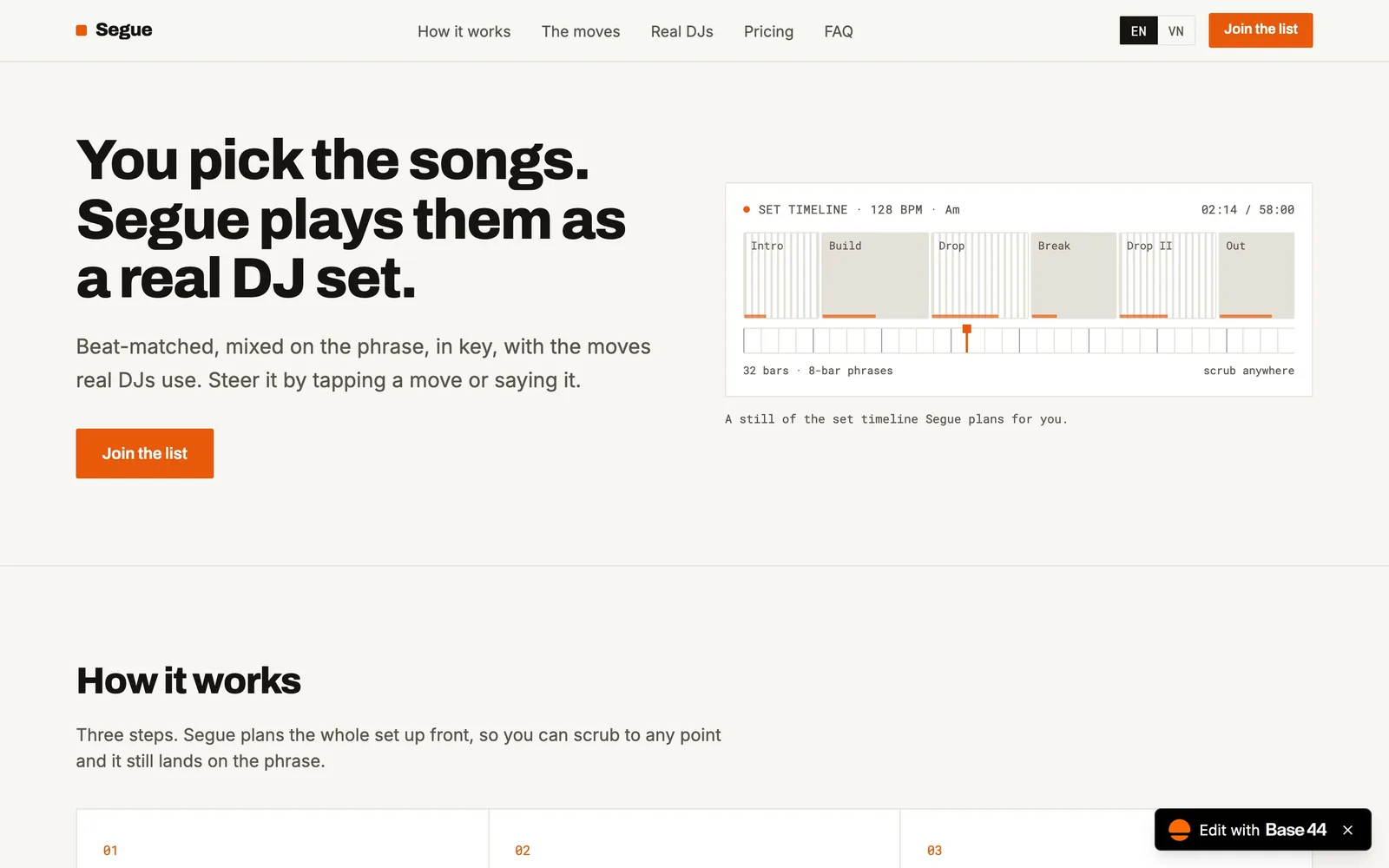
Segue by Nimit, built in one afternoon at Vibe-a-thon Saigon.
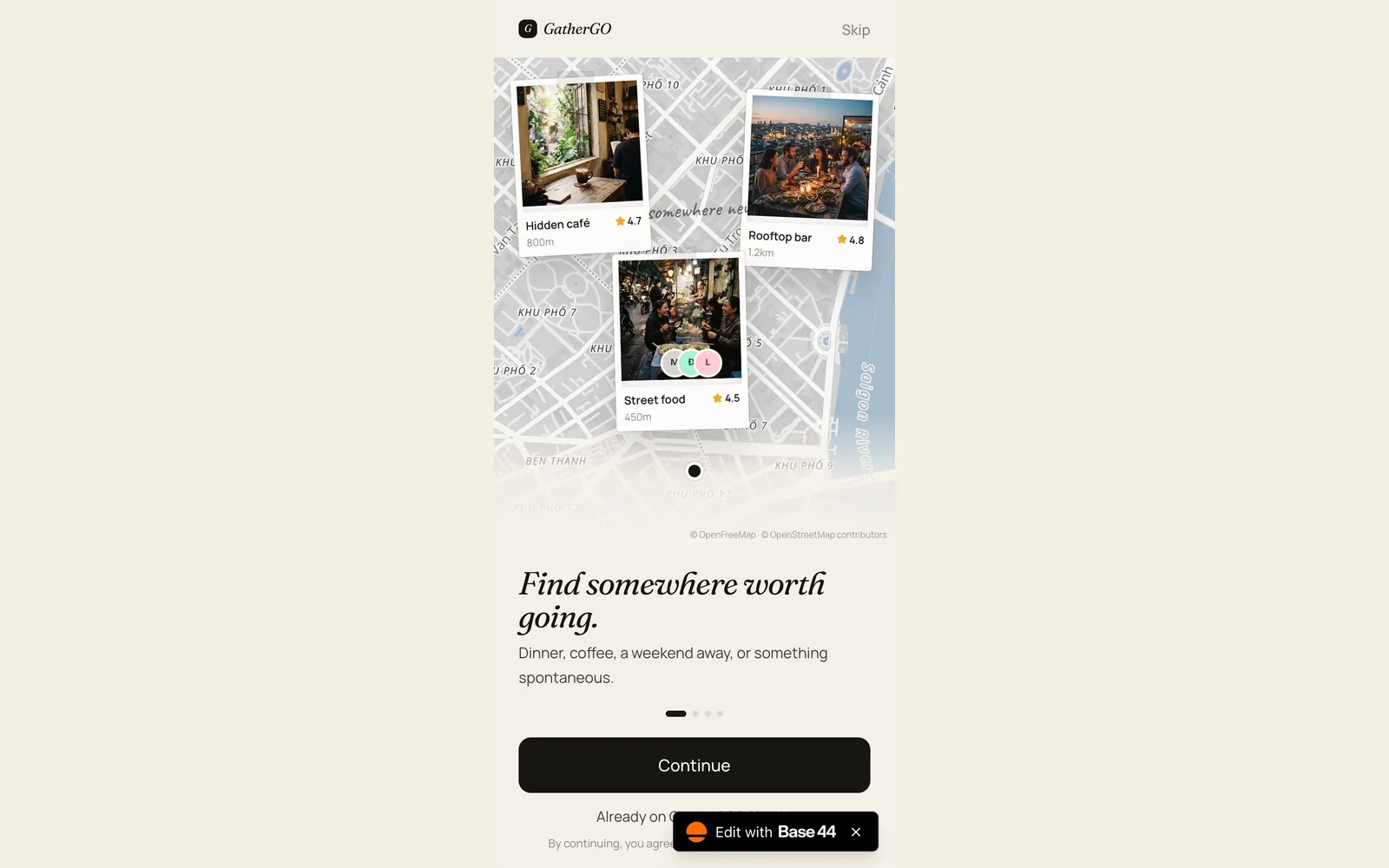
GatherGO by Thanh Huynh Dieu, built in one afternoon at Vibe-a-thon Saigon.
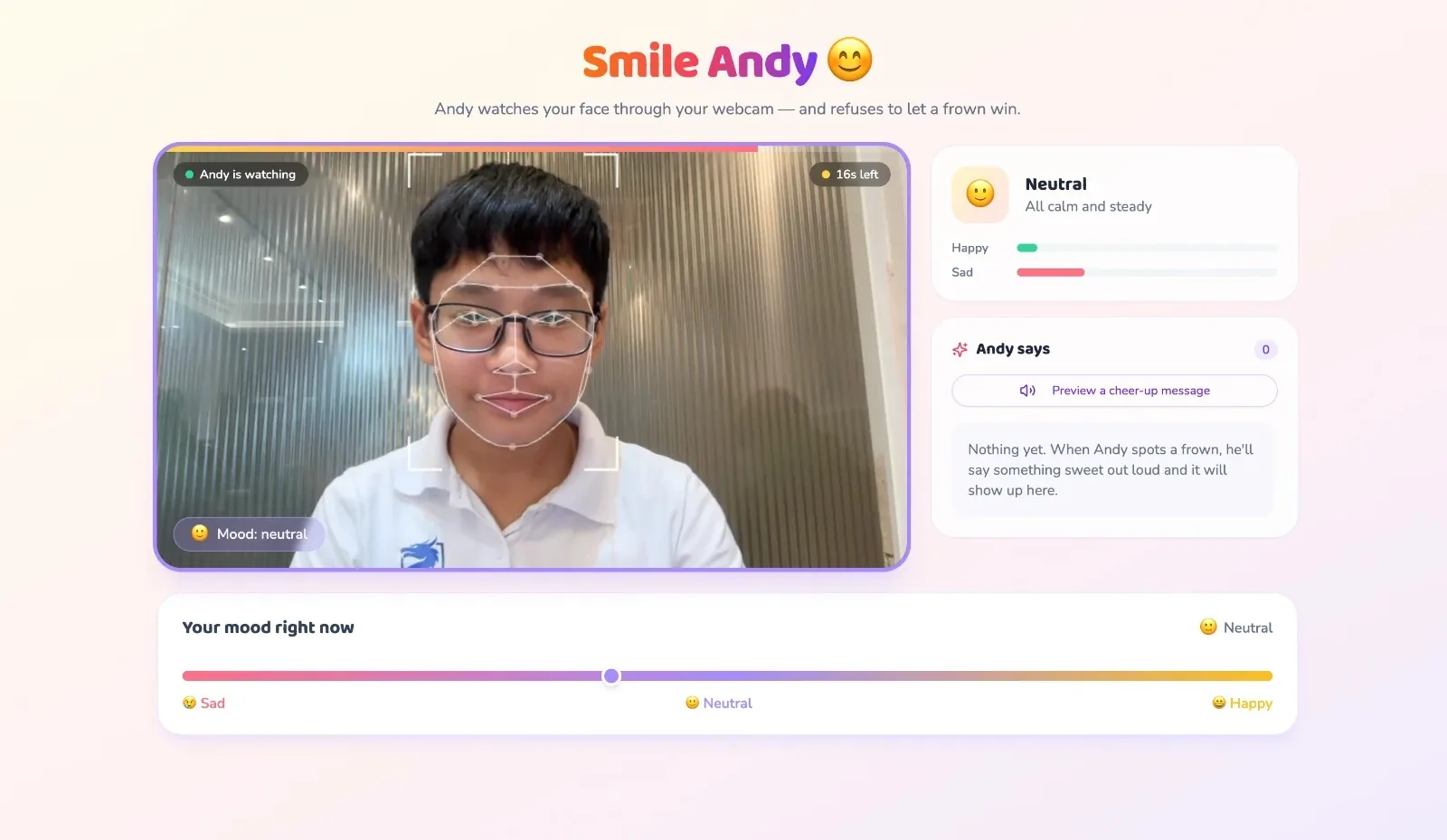
Smile Andy by Teddy Bui, built in one afternoon at Vibe-a-thon Saigon.
Winners took home 50 USD more in credits for the build tool they use, a domain name of their choice, a month as a Featured Launch on buildtolaunch and an hour of feedback from experienced builders. The full story is in the Vibe-a-thon Saigon recap.
FAQ
How should a student launch a side project?
Launch in small steps. Send the link to ten people who have the problem, ask for feedback, fix the biggest issue, then post in student communities and on a friendly launch board. Go to big public sites once you have early users.
What do I need before I launch?
A public link that works on a phone, a one-line pitch, one clear first action, a way to receive feedback, and a name and look of your own. You do not need a finished product.
How do I get my first 10 users, then 100?
For the first 10, message people with the exact problem, one by one, and ask one question. For the next 90, repeat what worked: specific communities, short build-in-public posts and a referral ask at the end of every conversation.
Are free launch sites still free in 2026?
Some are, some are not. As checked on 18 Nov 2026, BetaList says all submissions are paid and has no free option. Product Hunt says launching is free. Always check a site's own submission page before planning around it.
What should I measure after launch?
Three numbers: visitors, users who did the first action, and users who came back within a week. Add five short conversations with real users to learn why the numbers look the way they do.
What if I launch and nobody comes?
That is common. Check whether the problem is real for the people you reached, whether you posted where they are, and whether the message is clear in five seconds. Change one thing and launch again next week.
More guides
Browse the full series: first 100 users, Product Hunt checklist, free launch sites, launch post templates, Facebook groups, pricing your first app and Buildspace alternatives.